Features & Story Slicing
Create a feature, provide context, and let the AI decompose it into INVEST-compliant user stories in seconds.
Creating a feature
Navigate to Features in the sidebar and click New Feature. Fill in:
- Title — a short name for the feature (e.g. "User Role Management").
- Description — a plain-language description of what should be built. Write from the perspective of what the system should do, not how it should be implemented. The more detail you provide, the better the generated stories will be.
Feature analysis — before the AI slices
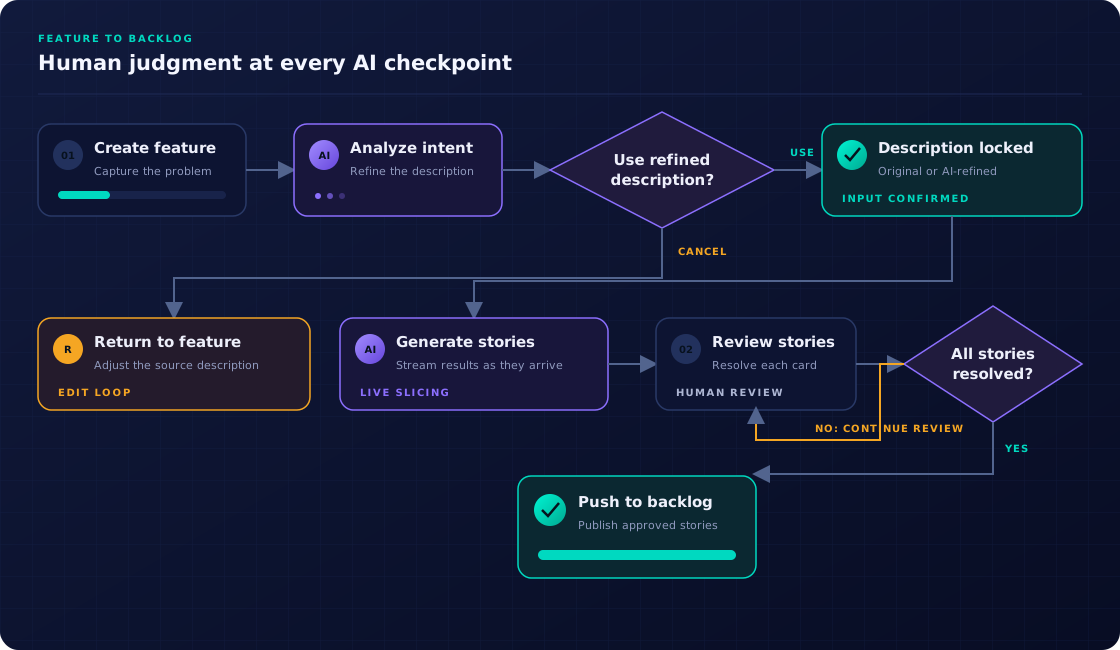
When you click Slice Stories, Storymate does not jump straight into generating stories. First, it runs an analysis pass on the feature description — the button label changes to Analyzing… while this happens.
The AI examines the description and determines:
- Whether the description is specific enough to produce useful, non-trivial stories.
- What information is missing, ambiguous, or assumed but not stated.
- How the description could be extended to yield better story coverage.
The result is a suggestion panel that appears on the feature page. It shows a list of concrete observations — e.g. "The description does not mention error handling for failed role changes" or "It is unclear whether viewers can see other members' contact details" — and a refined description that incorporates those suggestions, ready for you to review and edit before slicing.
From the suggestion panel you have three options:
| Action | Effect |
|---|---|
| Use refined & slice | Saves the refined description to the feature and uses it for story generation. Recommended — the AI has already thought through the gaps. |
| Skip & slice original | Ignores the suggestions and slices from the description as written. Useful when the description is intentionally brief or scoped. |
| Cancel | Dismisses the panel. You can edit the description manually and slice later. |
Story generation
After the analysis step, story generation begins. The feature status changes to SLICING and stories appear as they are generated — you do not have to wait for all of them. The progress indicator on the feature page shows how many have been created so far and whether the AI is still looking for more uncovered areas.
Before slicing you can optionally configure:
| Option | Description |
|---|---|
| Prompt template | A saved prompt that defines the AI's style, language, and story format. See Prompts & Documents. |
| Reference documents | Uploaded specs, business test cases, or organigrams to inject as context alongside the description. |
| Context documents | Documents attached to the feature or pulled from Confluence via the Context tab on the feature detail page. Use the Confluence page picker to select specific pages as context. |
| Personas | Active personas so the AI uses the correct "As a…" role. See Personas. |
| LLM model | Override the organization default model for this slice. Available if model routing is configured. See Model Routing. |
| Estimation methodology | Apply a specific estimation scale (Fibonacci, T-shirt, hours, custom) for generated stories. See Estimation. |
Feature detail layout
The feature detail page is organized into tabs for easy navigation:
- Stories — the story cards for review, approval, and modification.
- Context — attach reference documents and select Confluence pages as AI context for slicing.
- Dependencies — view and manage dependency relationships between the feature's stories.
- Activity — a chronological feed of all actions on this feature (slices, approvals, edits, comments).
Adding more stories
After the initial slice, click Add more on the feature detail page. The AI generates additional stories while being aware of the ones already created, actively avoiding duplicates.
Re-analyzing a feature
After the initial analysis pass, you can re-run analysis without triggering a full re-slice. Open the overflow menu on the feature detail page and select Re-analyze. The AI re-examines the current description and produces fresh suggestions — useful after you have refined the description.
Importing an epic from a connector
If you have a connected GitHub, GitLab, Jira, or ADO account, click Import Epic on the Features list, select a connector, and search for the epic by keyword. The epic title and description pre-fill a new feature, ready to analyze and slice.
Duplicate detection
From the overflow menu on the feature detail page, click Check Duplicates. Storymate compares the current feature's stories against all stories in the project and flags close matches with an explanation — including intra-feature duplicates (stories within the same feature that overlap). A resolution dialog lets you reject confirmed duplicates, keep intentionally distinct ones, or merge overlapping stories.
Story dependency analysis
Storymate can analyse the relationships between stories within a feature and across the project. Open the Dependencies tab on the feature detail page to:
- View an AI-generated dependency graph showing which stories block or are blocked by others.
- Run an impact analysis to see what would be affected if a specific story is delayed or removed.
- Add manual dependency links between stories for tracking purposes.
The dependency graph also appears at the project level under Dependency Graph in the sidebar, showing cross-feature relationships.
Exporting stories
Use the Export menu on the feature detail page to download all approved stories as Markdown or CSV. The Copy share link option generates a time-limited public HTML page — no Storymate account required for the viewer.
Feature statuses
| Status | Meaning |
|---|---|
| DRAFT | Feature created but not yet sliced. |
| SLICING | AI is actively generating stories. The page live-updates as stories appear. |
| REVIEW | Stories generated, awaiting human review. |
| DONE | All stories resolved. Ready for sprint planning or backlog push. |
Full slicing flow