Test Cases
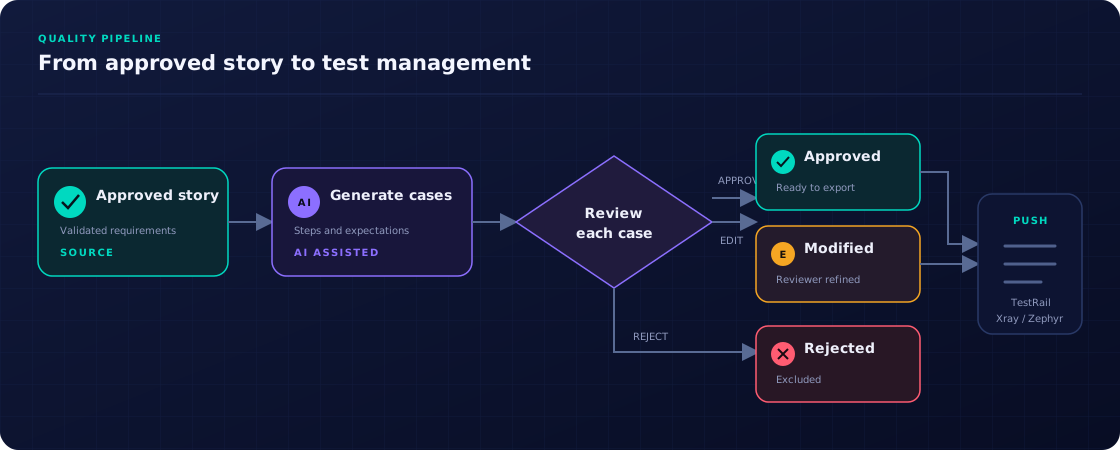
Generate structured or Gherkin test cases from approved stories using AI, review them, and push to your test management tool.
Test case formats
Storymate supports two formats for generated test cases:
Gherkin (BDD)
Generates scenarios in Given / When / Then format. Best for teams using Cucumber, SpecFlow, or Behave. Generated Gherkin is displayed with syntax highlighting (including a dark theme variant) for improved readability.
Structured steps
Generates numbered steps with an Action and Expected Result per step. Best for TestRail and manual QA teams.
Generating test cases
-
1
Open a story
Navigate to a story with status APPROVED or MODIFIED. Test cases can only be generated for resolved stories.
-
2
Click "Generate Test Cases"
Select the format (Gherkin or Structured) and optionally a test case prompt template from Settings. Click Generate.
-
3
Review generated cases
Each test case appears with its own approve / modify / reject workflow, identical to story review.
-
4
Push to test management tool
Select a test connector (Xray, TestRail, or ZephyrScale) and push approved test cases. Each pushed case gets an external reference link.
Test suites
Test suites group related test cases. From the Test Suites section in the sidebar, you can:
- View all suites across the project, organized by type (Unit / Acceptance, Integration, E2E).
- See all test cases within a suite with their coverage status.
- Export a suite's test cases to CSV or JSON.
Test case library
The Test Case Library shows all test cases across every story and suite in the project. Use it to search, filter by status or format, and get an overview of total test coverage.
Configuring test case prompts
Go to Settings → Test Case Prompts to manage the prompt templates used for test case generation. You can define separate default prompts for Gherkin and Structured formats, embedding your domain vocabulary and quality rules.
Generation and push flow